Architecting Reliable application on azure with scalability mindset

Rowland Adimoha / January 09, 2026
13 min read
Rowland Adimoha / January 09, 2026
13 min read
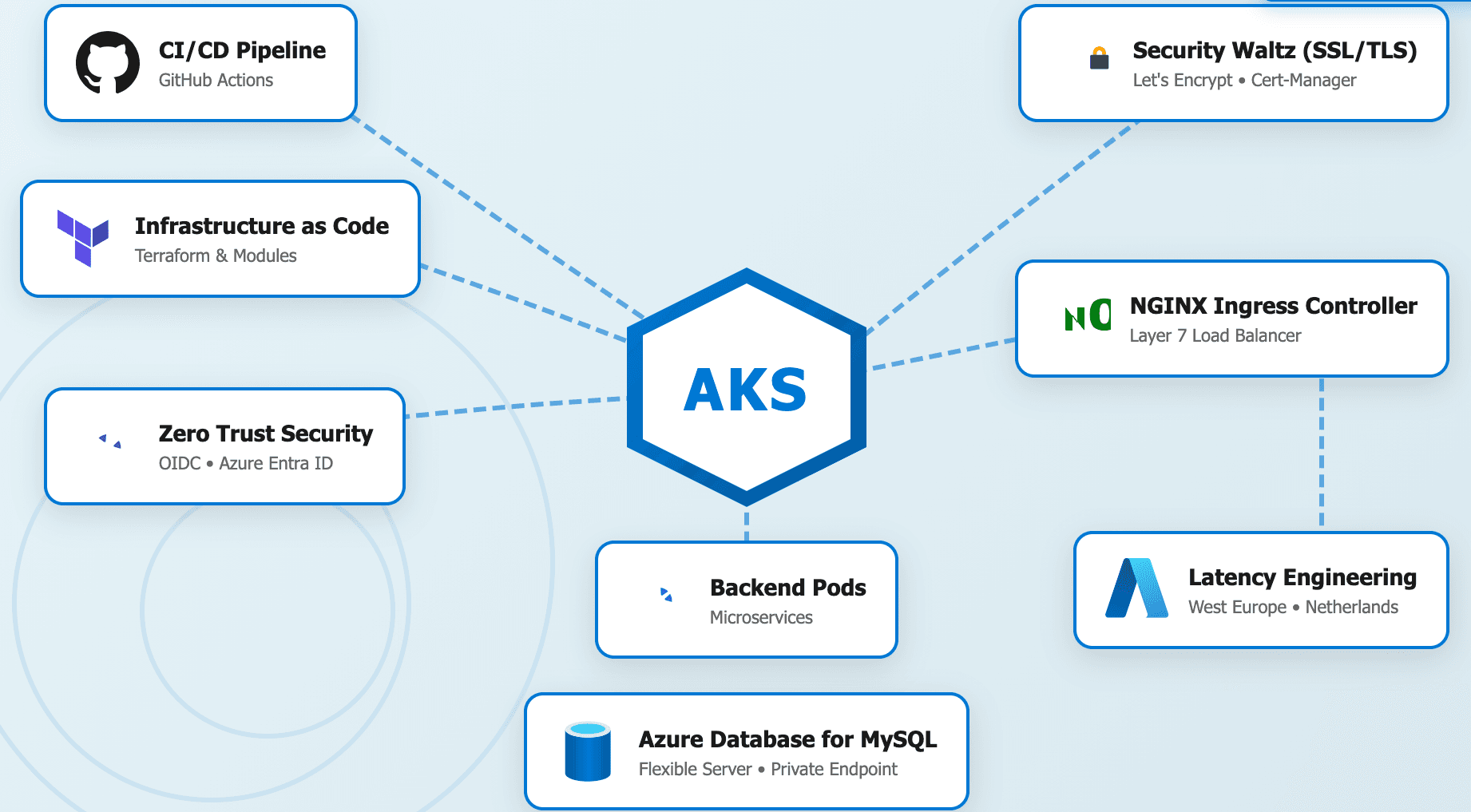
Whether you're building your first cluster or your hundredth microservice, the reliable Kubernetes environment remains a compelling case study. It's conceptually simple—just some containers running on virtual servers—yet deceptively complex at scale.
A single kubectl run command that spins up a pod works for demos and prototyping, but what happens when that prototype becomes mission-critical? What happens when you need to ensure 99.99% uptime, robust SSL termination for thousands of concurrent users, automated CI/CD pipelines that won't break on a Friday evening, managed database resilience with zero data loss, and OIDC-based identity verification that keeps hackers at bay?
That gap between "works on her machine" and "scales in the cloud" is where our journey begins. It’s the gap where many projects fail—not because the application code is bad, but because the infrastructure supporting it is brittle, opaque, and hard to maintain. The difference between a "working" system and an "engineered" system is the presence of clear boundaries and automated delegation.
Together, we'll build a reliable, scalable infrastructure on Azure Kubernetes Service (AKS), transforming a manual "Click-Ops" setup into a clean, layered architecture. We'll explore how to structure cloud services using modular Terraform principles, implement structured deployment workflows, design stable infrastructure contracts, and build resilient security integrations. By the end, we'll have both a complete reliable stack and a blueprint for your next maintainable cloud application.
Let's start with the honest reality of version one. When you're building a new project, the primary goal is to get a functional environment up and running as quickly as possible. We want to see our code in the "wild." Using the Azure Portal’s visual simplicity, we naturally gravitate toward creating resources manually. We click through the bright blue buttons, select our region, and follow the "Default" settings. The result: an infrastructure doing far too much work without a version-controlled source of truth.
Consider this initial manual setup approach. You create a Virtual Network (VNet), you click through the AKS creation wizard, you manually whitelist your home IP address in the database firewall, and you copy-paste the Kubeconfig file to your local machine’s .kube/config. This code "works," and you ship it. But you've just created insurmountable technical debt. Let's examine the specific engineering failures introduced by this "Click-Ops" mindset:
This is the technical debt that will cripple our project over the long term. It leads to the "Snowflake Server" syndrome, where your reliable environment becomes unique, beautiful, and impossible to replicate if it ever dies. The first step to paying it down is establishing clear boundaries between your intention (code) and the reality (cloud). This isn't about adding unnecessary complexity for the sake of it—it's about creating a structure that enables future growth, security, and absolute maintainability.
Now, let's look at how we can build that same infrastructure using a clean, automated approach. Notice what it doesn't do: it doesn't require a human being to log in and click buttons across fifteen different screens. Its only responsibilities are to define the desired state, manage the lifecycle of resources, and ensure absolute consistency across environments (Staging vs. Production). It contains no manual steps, no secrets stored in local text files, and no "snowflake" configurations.
To enable this, we must configure our Remote Backend. This is the "Brain" of Terraform. It ensures that two engineers cannot try to update the infrastructure at the same time.
# terraform/provider.tf

terraform {
  required_version = ">= 1.5.0"

  # The State Locking Mechanism
  backend "azurerm" {
    resource_group_name  = "glp-terraform-state-rg"
    storage_account_name = "glpterraformstate742"
    container_name        = "tfstate"
    key                  = "staging.terraform.tfstate"
    # Note: Azure Blob Storage supports native state locking!
    # No need for a separate DynamoDB table like in AWS.
  }

  required_providers {
    azurerm = {
      source  = "hashicorp/azurerm"
      version = "~> 4.0"
    }
  }
}

provider "azurerm" {
  features {}
}
The benefits of this shift are immediate:
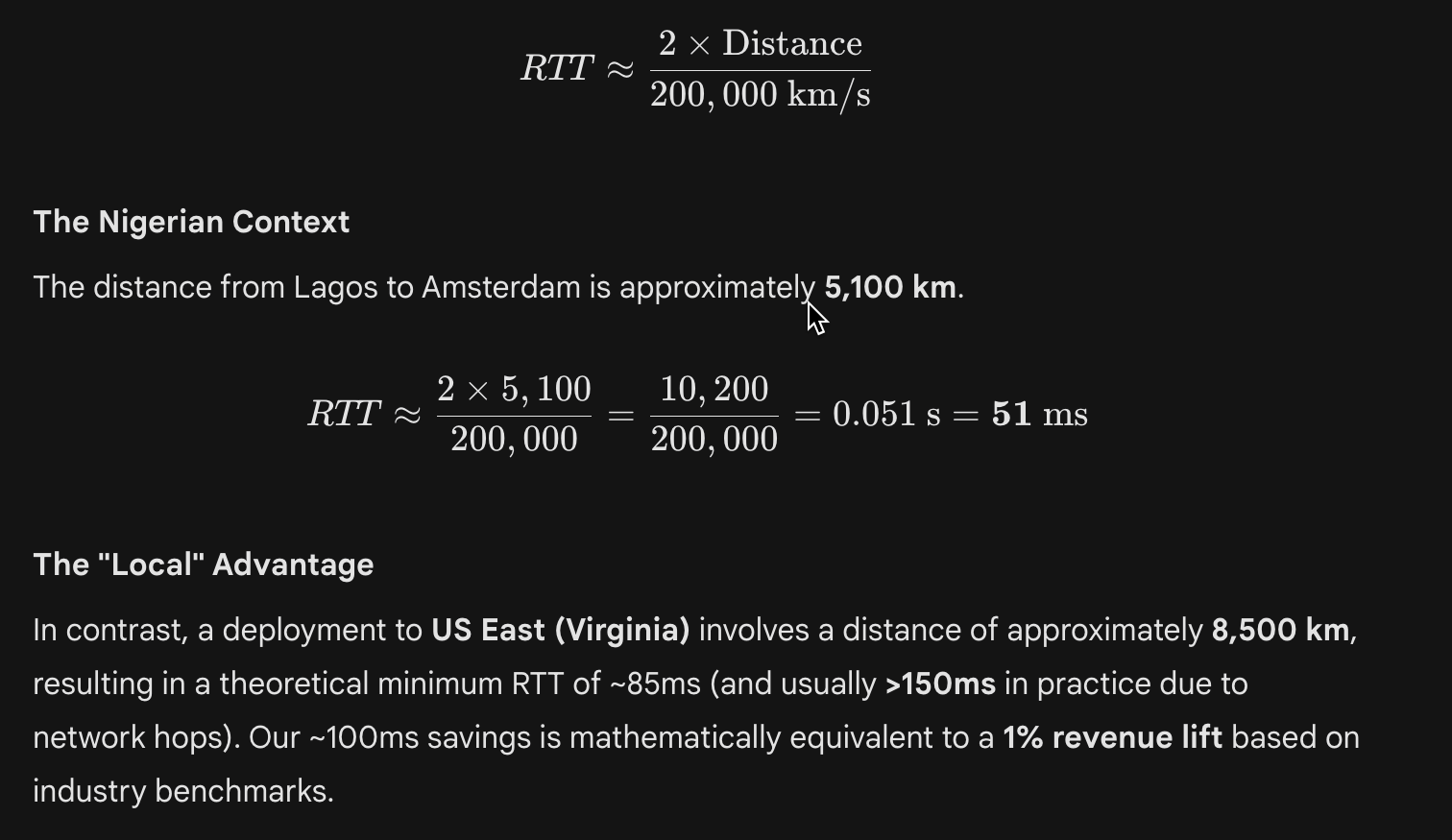
terraform plan to see exactly what will happen before it happens.In high-frequency fintech and lottery platforms, latency is not just a nuisance; it is a direct revenue killer. Amazon famously discovered that every 100ms of latency costs 1% in sales. Google found that an extra 0.5 seconds in search generation dropped traffic by 20%.
As Distinguished Engineers, we do not choose regions based on "history" or "sentiment." We choose them based on Physics.
We deploy to West Europe (Netherlands) not because it is scenic, but because it is physically proximate to our primary user base in Nigeria. Light travels at approximately 200,000 km/s in fiber optic glass (about 2/3 the speed of light in a vacuum).
 Image
Image
We are essentially "Latency Engineers." We map our user density, calculate the fiber distance, and place our Kubernetes clusters at the gravitational center of that user mass. To manage this at scale without IP exhaustion, we utilize the Azure CNI Overlay networking model, which decouples pod IPs from the VNet while maintaining native throughput.
Amateur security relies on a "Crunchy Shell, Soft Interior." They build a firewall and assume everything inside is safe. A senior architect knows that the interior is never safe. We use the Zero Trust model.
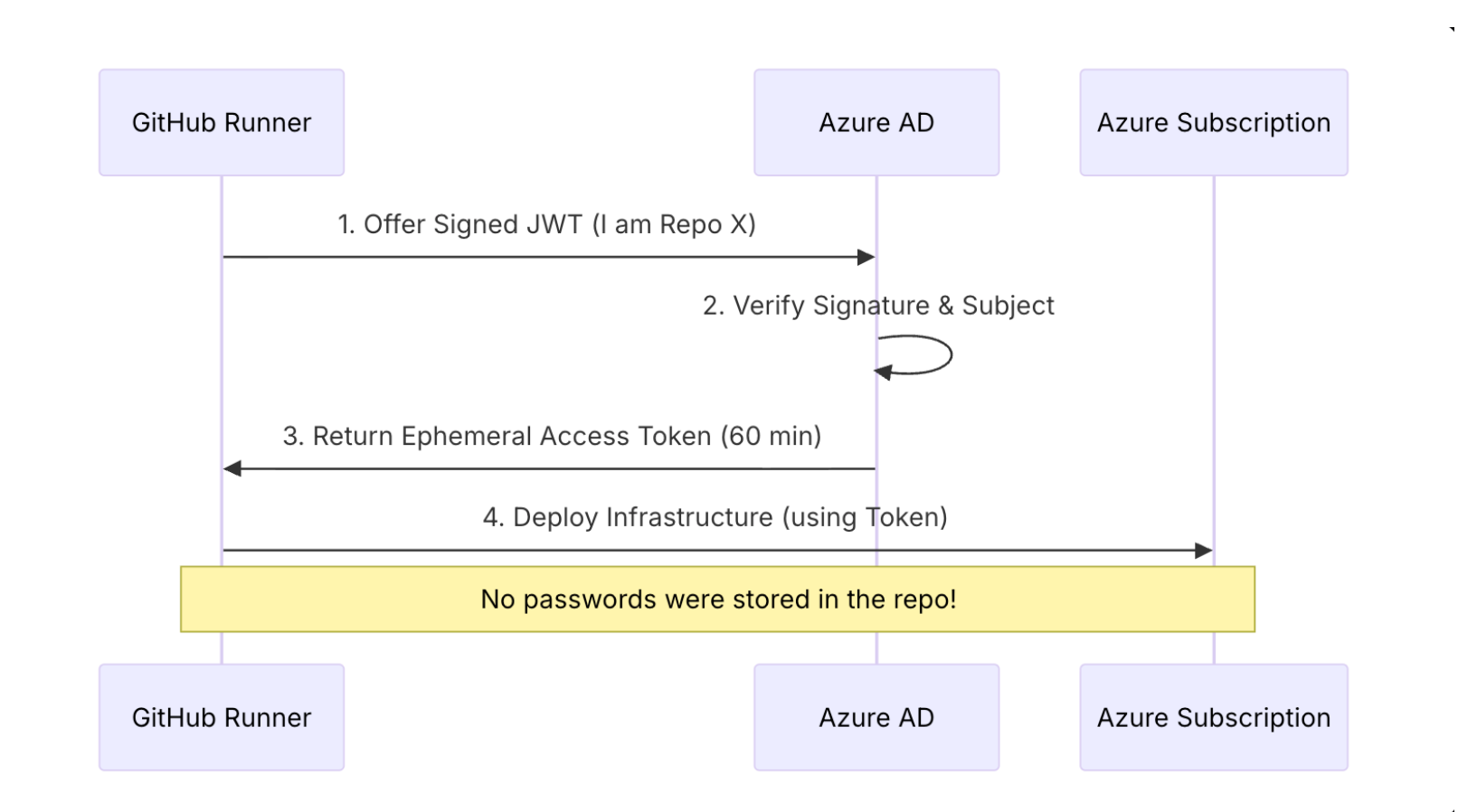
In our CI/CD pipeline, we NEVER use static passwords. We use OpenID Connect (OIDC). GitHub presents a token that says "I am indeed this specific repository, running this specific job." Azure verifies this cryptographically and grants access for exactly 60 minutes.
 Image
Image
In AKS, our backend pods don't have administrative access to the VNet. They are granted a Managed Identity that is scoped only to their specific needs.
To be a senior architect, you must speak the language of the stack. You must understand the Open Systems Interconnection (OSI) model as it applies to Kubernetes.
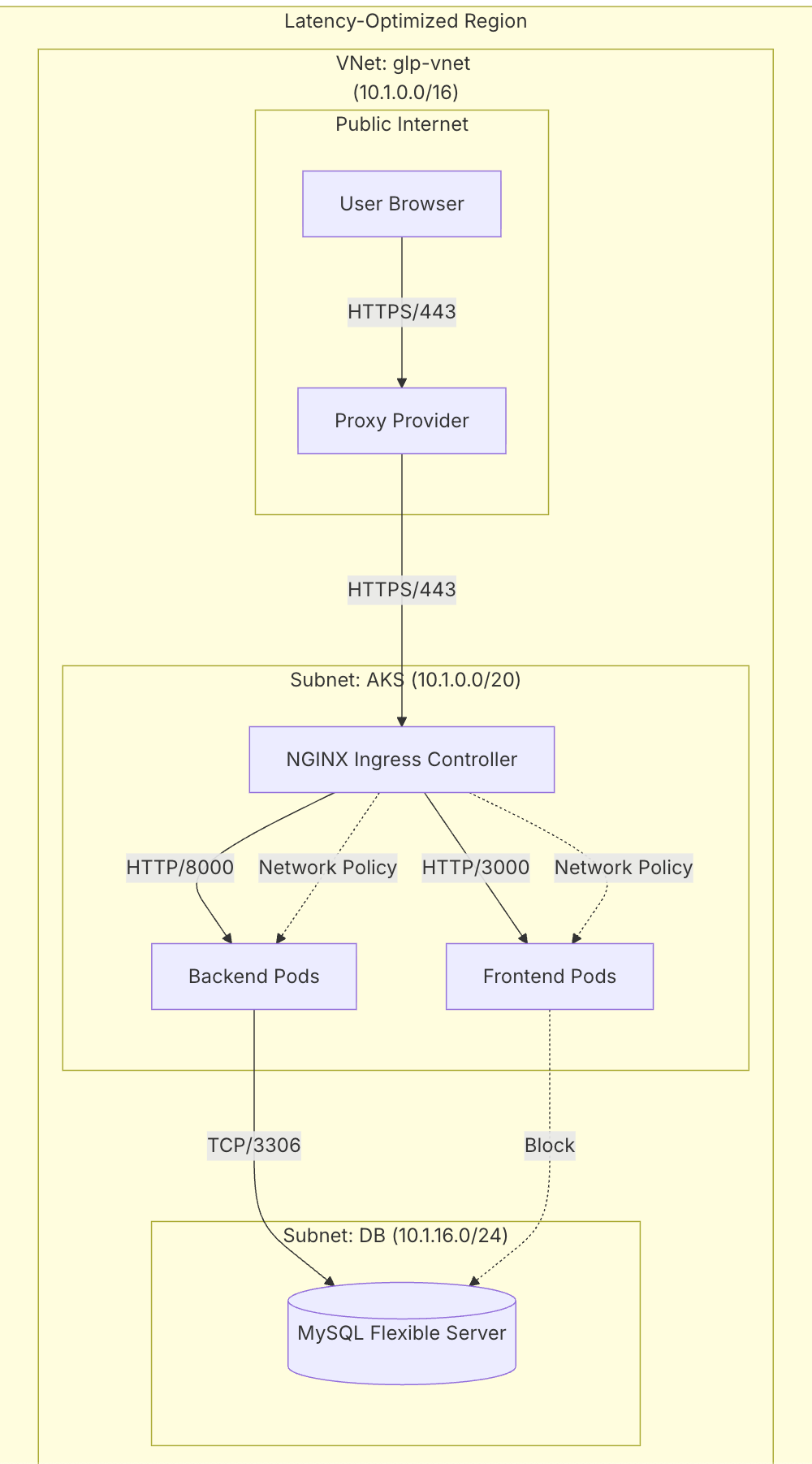
Let's visualize how our Network Layer (Layer 3) supports the Application Layer (Layer 7).
 Image
Image
This is where Azure CNI Overlay lives. It provides the scale we need—up to 1,000 nodes per cluster—without consuming thousands of private IP addresses from the host VNet. This is the modern standard for high-density Kubernetes deployments.
The Ingress Controller lives here. It understands paths like /api. It also handles the "SSL Termination."
glp-azure-aks-infrastructure)terraform/[main.tf](http://main.tf)This is the root orchestration file. It ties together the modules.
terraform/modules/networking/[main.tf](http://main.tf)resource "azurerm_virtual_network" "main" {
name = "${var.project_name}-vnet"
address_space = ["10.1.0.0/16"]
}
resource "azurerm_subnet" "aks" {
name = "aks-subnet"
address_prefixes = ["10.1.0.0/20"]
service_endpoints = ["Microsoft.Sql"] # Optimization!
}address_space = ["10.1.0.0/16"]: This defines our universe. 65,536 IPs.service_endpoints: This optimizes traffic. When AKS talks to SQL, it stays on the Microsoft Backbone Network, bypassing the public internet entirely.glp-core-node-backend-k8s)kubernetes/deployment.yamlapiVersion: apps/v1
kind: Deployment
spec:
replicas: 2
template:
spec:
containers:
- name: backend
image: glpregistry.azurecr.io/backend:latest
ports:
- containerPort: 8000
resources:
requests:
cpu: "250m" # Guarantee 1/4 Core
memory: "512Mi"
limits:
cpu: "500m" # Throttle at 1/2 Core
memory: "1Gi" # OOMKill if exceededrequests vs limits: The requests guarantee resources (preventing starvation), while limits prevent a rogue process from consuming the entire node (preventing noisy neighbors).As of January 2026, Node 24 is the Active LTS (Long Term Support) release. It represents the peak of modern JavaScript runtime stability, featuring the Maglev Compiler for V8 (optimizing both short-lived execution and long-running services) and a stabilized watch mode.
We utilize a Multi-Stage Build to leverage this high-performance runtime while maintaining a lean, secure footprint.
# Stage 1: The Builder
FROM node:22-alpine AS builder
WORKDIR /app
COPY package*.json ./
RUN npm ci
COPY . .
RUN npm run build

# Stage 2: The Runner (Production)
FROM node:22-alpine AS runner
WORKDIR /app
ENV NODE_ENV production
# Copy ONLY the build artifacts, leaving the 500MB node_modules behind
COPY --from=builder /app/.next/standalone ./
COPY --from=builder /app/public ./public
COPY --from=builder /app/.next/static ./.next/static
CMD ["node", "server.js"]Result: Image size dropped from 1.2GB to 180MB. This isn't just "neat"; it reduces our scaling time from 4 minutes to 45 seconds.
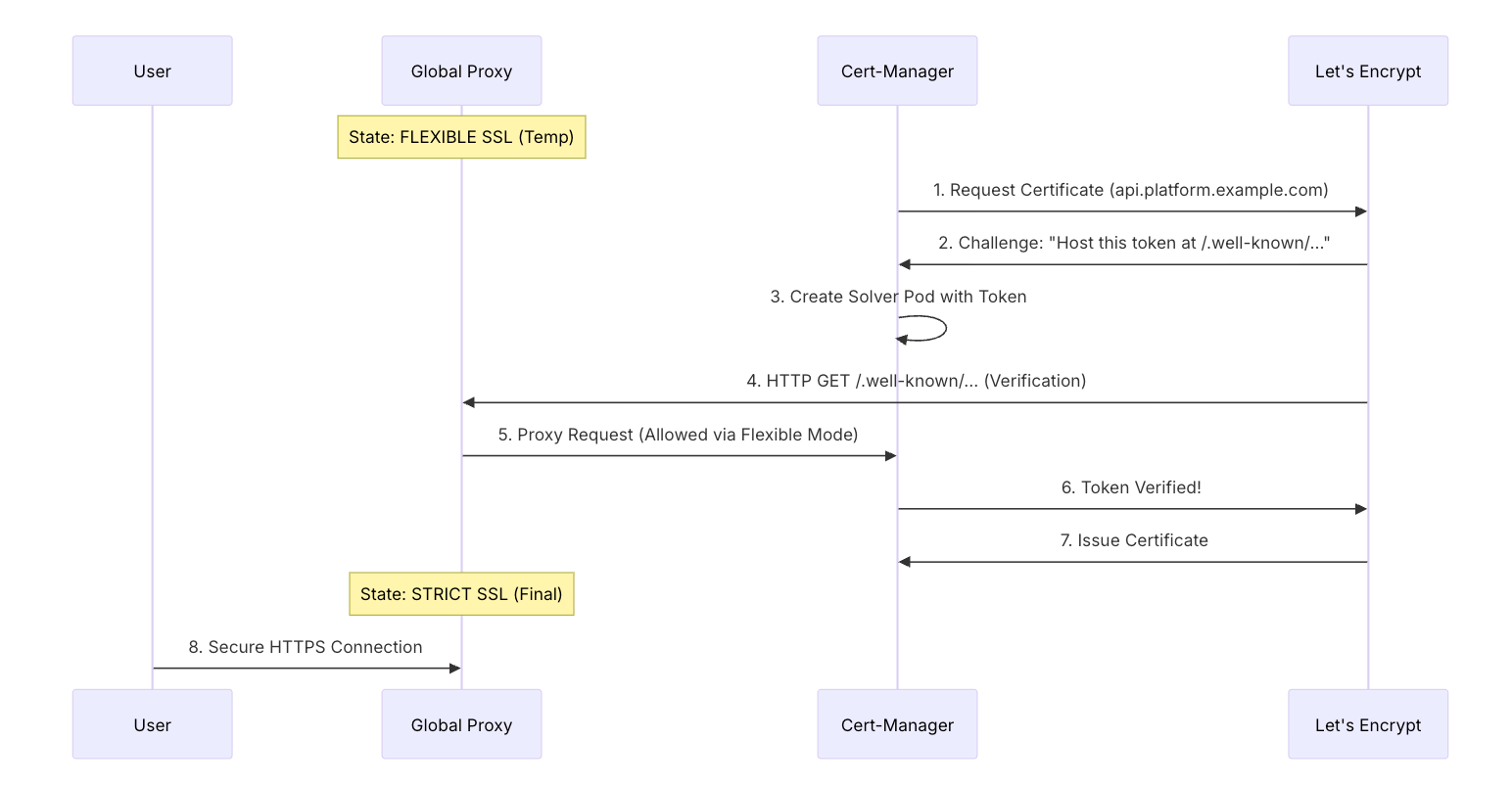
In any cloud platform, SSL is the "Skin" of your infrastructure. Let's examine the forensic breakdown of how Cert-Manager resolves an SSL certificate via the ACME Protocol.
This was our hardest bug. The global proxy and Let's Encrypt were fighting. Here is how we solved it.
 Image
Image
The "Error 526" Forensics: The Proxy's "Strict" mode requires a valid cert to even talk to the server. But the server is trying to GET the cert from Let's Encrypt THROUGH the Proxy. This is a circular dependency. We use the "Security Waltz" (temporarily dropping to Flexible) to break the cycle.
A senior architect builds a Culture, not just code.
If it isn't in Git, it isn't real. We have disabled the "Edit" button in the Azure Portal for our production resources.
We never use the latest tag. Every deployment is pinned to the Git SHA (e.g., glp-registry/app:8a2f1b3).
An architectural change requires an update to the documentation. We treat our architecture_[overview.md](http://overview.md) as a living organism.
As we look toward the next decade, the role of the architect is evolving from "Builder" to "Gardener." We no longer build static structures; we plant self-healing systems.
In the future, we will remove kubectl apply from our CI/CD pipelines entirely. We will use ArgoCD. ArgoCD watches our Git repository and ensures that the cluster always matches the code. If someone manually changes a service in the portal, ArgoCD will immediately revert it. This is "Continuous Reconciliation."
We will add a Service Mesh like Istio. This will give us Layer 7 visibility between internal services. We will be able to say: "Send 10% of traffic to the new version of the backend and 90% to the old version." This is Canary Deployment.
By embracing these principles, you move from simply writing code to engineering a world-class system. You build a well-organized environment where any engineer can confidently and safely contribute. Modern cloud engineering is about designing a lifecycle that is automated, secure, and observable.
The goal isn't perfection on the first day. It's building systems that can evolve safely, scale predictably, and welcome new contributors without requiring an archaeological expedition.
As you progress beyond the initial deployment, consider these tools to further enhance your scalability mindset:
kubectl apply. ArgoCD automates the reconciliation of your Git state with your cluster state, ensuring your configuration never drifts.